Morning! 😃 ☕️
Almost the whole body is gone today.
The length check, the loop, and now the has_number decision - all blank. What's left on the page is close to bare bones: the def line, the loop header, the flag, and the two final verdicts.
Don't panic at the blanks. Take a breath and go one piece at a time - short-check, loop, decision. Picture yesterday's answer key and let the lines come back on their own. If you can rebuild it today, tomorrow's blank page will feel easy.
In today's email...
-
🐍 Day 4: Most of the body is blank - only the frame remains
-
💭 The line that turns "did we find a number?" into a verdict
-
🔍 Two finished loops, two different endings
-
☕ Ada hands you a password to test your version on
THE FUNCTION 🐍
def check_password(password):
    ____________________
        ____________________
    has_number = False
    for char in password:
        ____________________
            ____________________
    ____________________
        return "Strong"
    return "Medium"
TODAY'S LINE 💭
The new blank is the decision line:
if has_number:
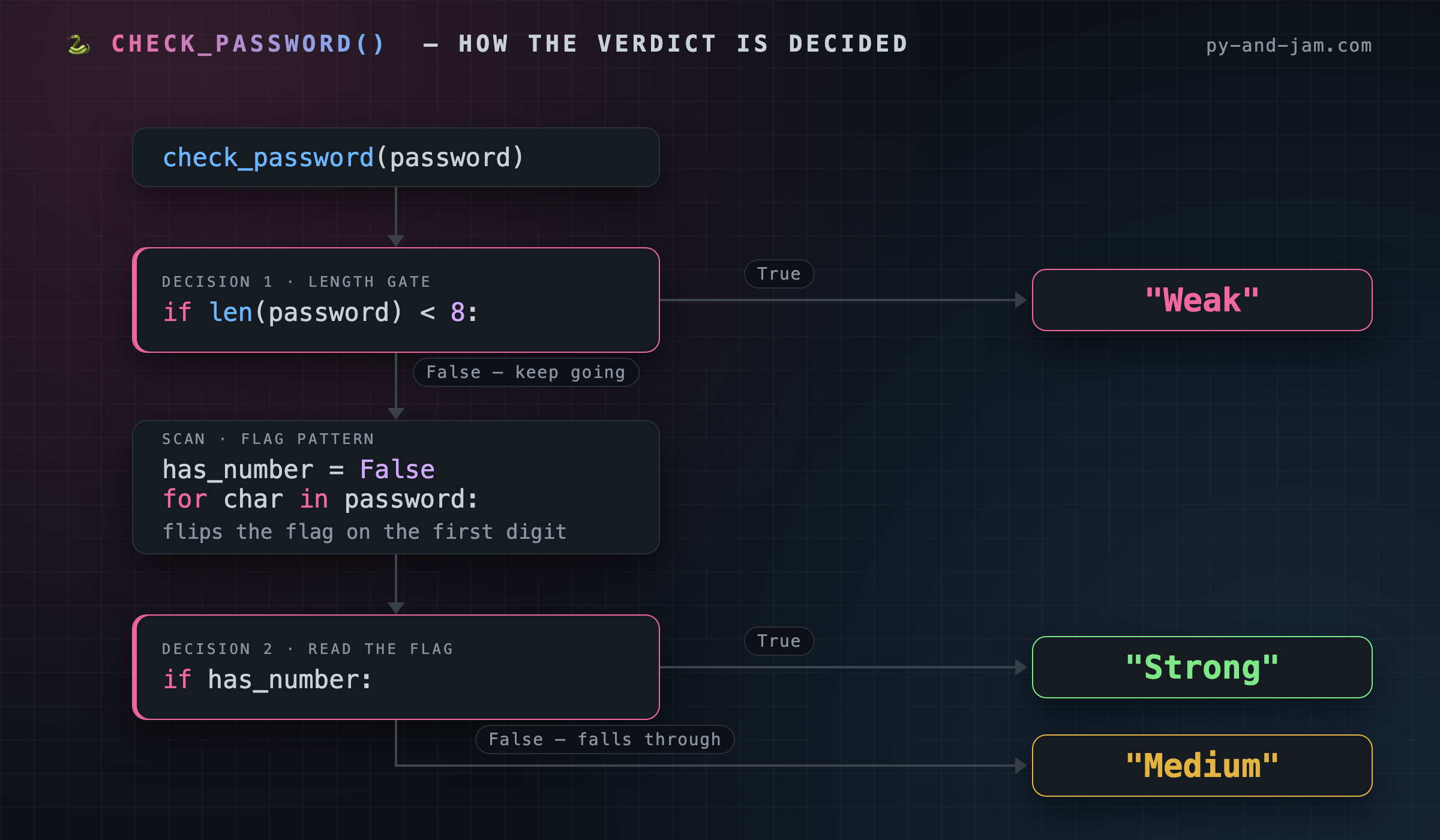
By the time the loop finishes, has_number is either True (we found a digit) or still False (we didn't). This one line reads that flag and picks the ending.
if has_number: is Python shorthand for if has_number == True: - when the flag is True, the indented return "Strong" runs. If it's False, that branch is skipped and the function falls through to the last line, return "Medium".
Look closely at that last line. It has no if above it - it just sits at the bottom of the function. That's deliberate: it's the default, the answer for anyone who didn't earn "Strong". A function that ends in a bare return can never fall off the end with nothing to say.
TRACE IT 🔍
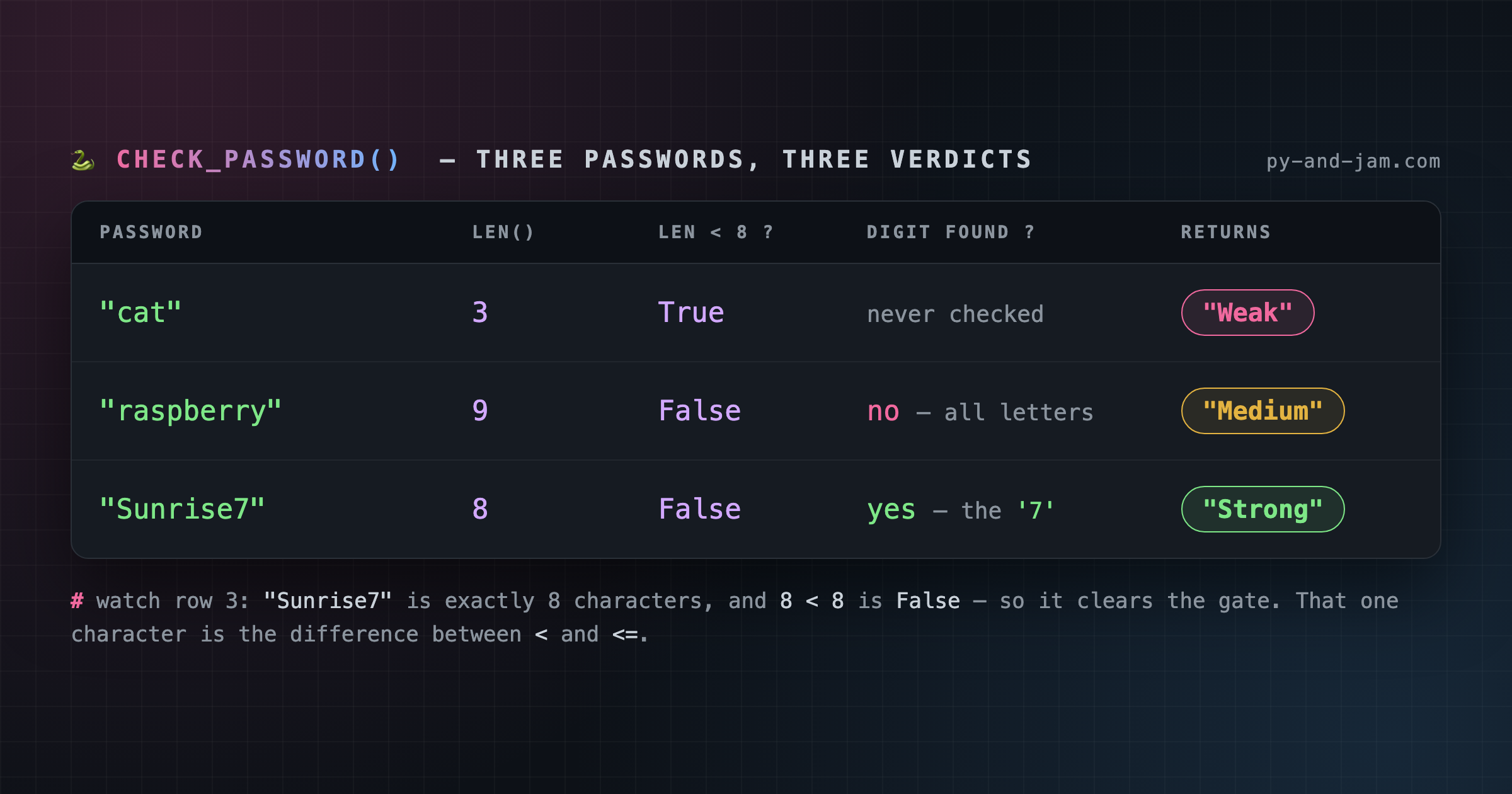
The loop has finished. Everything now depends on one value. Here are the two endings side by side:
password       has_number after loop    line 8: if has_number:    returns
-----------    ---------------------    ---------------------    --------
"Sunrise7"     True                     taken  -> line 9         "Strong"
"raspberry"    False                    skipped -> line 10       "Medium"
Both passwords cleared the length gate. Both walked every character. The only difference between "Strong" and "Medium" is what one boolean held when the loop stopped.
See how the whole function funnels down to here? Line 4 sets the flag, the loop maybe flips it, and line 8 reads it. Set a flag, change it while you work, check it at the end - that trio is one of the most useful habits in programming, and you just built all three.
COMMON BUG 🐛
Indent the last line by mistake and you get a function that works for half your users and silently breaks for the rest:
    if has_number:
        return "Strong"
        return "Medium"
Now return "Medium" is inside the if, sitting behind a return that already fired - so it can never run. A password with a digit still gets "Strong". A password without one skips the whole block, reaches the end of the function, and gets back None.
That's Python's quiet failure mode: no crash, no error message, just None where a verdict should be. Then some other line downstream blows up and you spend an hour looking in the wrong file.
The other classic here is if has_number = True: - a single = where you meant ==. Python catches that one for you with a SyntaxError, which is a kindness. The indentation bug it will not catch.
WHY IT MATTERS 🧠
if has_number: works because Python treats values as truthy or falsy on their own - no comparison needed. True, a non-empty string and a non-zero number are all truthy. False, None, 0, "" and [] are all falsy.
That's why yesterday's if not password: catches an empty string, and why experienced Python code reads if items: rather than if len(items) > 0:. It's the same idea you just used, all over the language.
WITH ADA ☕
Rebuild the body from memory, then bring it to Ada at py-and-jam.com.
Ada will hand you a password to try - something like "Sunrise7". Run your function on it and check: does your verdict match what you'd expect? If a line is off, Ada shows you exactly where, which is the fastest way to make it stick for good.
LEVEL UP 🚀 Add a second flag and a fourth verdict - a password with a digit and a symbol:
    has_symbol = False
    for char in password:
        if not char.isalnum():
            has_symbol = True
    if has_number and has_symbol:
        return "Very Strong"
isalnum() is True for letters and digits, so not char.isalnum() catches everything else: !, -, #. Same pattern you already know, run twice.
One catch worth spotting yourself: that if has_number and has_symbol: has to sit above the plain if has_number: - otherwise "Strong" returns first and "Very Strong" never happens. Order your checks strictest-first.
ANSWER KEY ✅
Blanked today: lines 2, 3, 6, 7 and 8 - the length check, the digit check inside the loop, and the has_number decision.
Today's new blank:
if has_number:
The full function:
def check_password(password):
    if len(password) < 8:
        return "Weak"
    has_number = False
    for char in password:
        if char.isdigit():
            has_number = True
    if has_number:
        return "Strong"
    return "Medium"
See you tomorrow - the whole thing, from memory. 🐍 The Py & Jam Team
There's a better way to learn.
Py & Jam delivers one memorable disappearing function to your inbox daily. It’s a simple, effective way to build fluency without the frustration.